




My secondary PTT handset does not communicate with the primary PTT handset or the DriveDOCK Extreme
The Wireless PTT100A is an optional accessory. Using the Y-connector included in the kit connect the PTT100A to the PTTW1A (see image below) then, the PTT100A Wireless handset must be paired to the primary PTT-W1A gateway cradle to enable the dual PTT configuration.
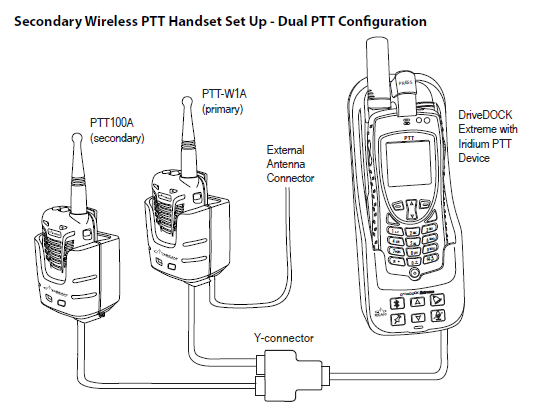
How to pair the PTT100A handset to the PTT-W1A gateway cradle:
- Switch ON the DriveDOCK Extreme and make sure that the PTT-W1A gateway cradle and PTT100A handset are turned ON.
- Remove the primary Wireless PTT-W1A handset from the primary gateway cradle.
- Put the PTT100A handset into pairing mode: Hold the secondary Wireless PTT-100A handset while pressing both the blue volume controls for 5-8 seconds, until the blue LED flashes and you hear it beep.
- Place the Wireless PTT100A handset into the PTT-W1A primary gateway cradle and after a few seconds the Wireless PTT100A handset will sound a two-tone confirmation indicating that pairing has completed.
- LED will be a solid blue once paired.
- Remove the PTT100A from the primary gateway cradle.
- Put the PTT100A back to its secondary charging cradle.
- Put the PTTW1A handset back to the primary gateway charging cradle.
- Now, a dual PTT configuration has been enabled.